Key Takeaways
- Ditch static drills: a children’s Chinese language Android download turns passive flashcard review into interactive games that hold a 2-8 year old’s attention far longer than a stack of paper cards.
- Check Google Play listings before you install anything; the Data Safety section tells you exactly what’s collected, which matters more for a kids’ app than flashy screenshots.
- Look for apps offering both simplified and traditional character exposure with built-in audio, since paper flashcards can’t teach pronunciation or tone the way a guided voice can.
- Stroke order games on a tablet can reinforce handwriting basics, but don’t assume screen practice replaces every bit of pen-and-paper repetition; the two work best together.
- A free trial or limited free version lets you test whether an app fits your child’s learning style before committing, which beats buying a flashcard set you can’t return.
- If you’ve got more than one child, prioritize apps that sync progress across devices and support separate learner profiles. One shared login gets messy fast.
That box of Chinese flashcards in the closet? It’s probably gathering dust. A stack of laminated cards with pinyin on one side and a character on the other looks impressive in a parenting photo, but ask any 5-year-old how much they remember three weeks later and you’ll get a shrug. That’s not a knock on the parents who bought them, it’s just how young kids actually learn a tonal language with a completely different writing system.
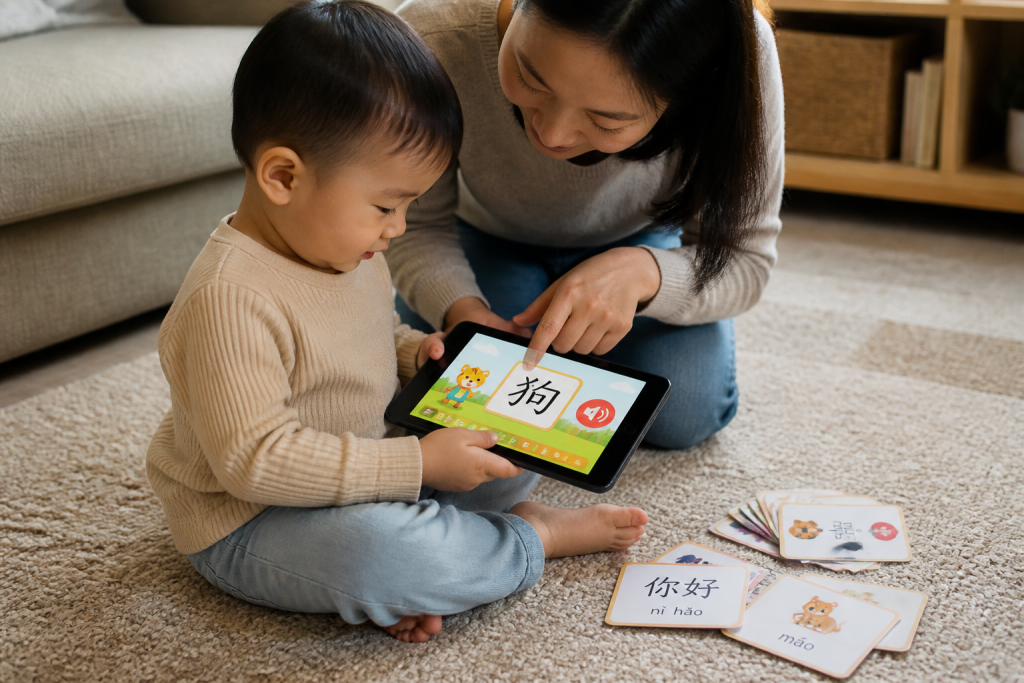
Searching for a children’s Chinese language Android download has become the more practical move for a reason: a phone or tablet can do things a paper card never will, like play back native pronunciation, react to a child tapping the wrong tone, or turn stroke order into a game instead of a worksheet. Realistically, kids ages 2 to 8 need repetition, sound, and a bit of play to hold onto new vocabulary. A stack of cards can’t provide any of that on its own.
So what actually makes an app worth installing over the flashcard method your own parents might have used? Let’s get into what’s different and what to check before you tap install.
Why Flashcards Alone Struggle to Teach Real Chinese
Picture a kitchen table covered in laminated cards a four-year-old pointing at 猫 (cat) and guessing instead of reading. The parent says the word aloud, the kid repeats it once, then the deck gets shuffled and forgotten by dinner. That’s the flashcard cycle in most homes. It works for memorizing shapes for about a week, then interest drops off a cliff. This is exactly why a growing number of families searching for a real children chinese language android download are skipping the paper stack entirely.
The Pinyin and Character Recognition Gap
Here’s what most people miss: pinyin isn’t just a pronunciation crutch, it’s a bridge between sound and character. A static card can show 你好 next to “nǐ hǎo,” but it can’t test whether a child actually connects the tone marks to the sound. Traditional and simplified characters look nothing alike in plenty of cases 學 versus 学 and a physical deck rarely covers both. Kids need repeated, varied exposure to build that recognition, not a single flashcard glance.
What Static Cards Can’t Do for Pronunciation
Tone is everything in Mandarin mā, má, mǎ, and mà are four different words. A paper card can’t tell a child their tone was flat. It just sits there. Realistically, a five-year-old needs immediate feedback to correct pronunciation before a habit sets in, and cardboard can’t deliver that.
What a Chinese Language Android Download Actually Adds
Flashcards sit in a drawer.
A phone doesn’t. That’s the whole argument in one line: a stack of paper cards asks a four-year-old to sit still and review, while a game asks them to play, tap, and win something. Parents searching for a children Chinese language Android download aren’t just chasing convenience; they’re chasing engagement that actually sticks past week one.
Interactive Games Versus Passive Review
Paper flashcards work on repetition alone, show the character, say the word, flip, repeat. That’s fine for an eight-year-old doing homework. It’s brutal for a two- or three-year-old with a 90-second attention span. A well-built app replaces flat review with short interactive games: matching sounds to pictures, tapping the right character, moving through a level instead of a stack. The learning happens, it doesn’t feel like a review. It feels like winning.
Audio Support for Simplified and Traditional Characters
Here’s what paper can’t do: speak. A printed flashcard shows a character but says nothing, so parents end up guessing at pronunciation themselves (not ideal if Mandarin isn’t their first language). A downloaded app pairs simplified characters with native audio, letting kids hear correct tone and rhythm on every single tap no guessing, no mispronounced reinforcement baked in early. That audio layer, more than the graphics or the games, is the real gap paper can’t close.
How to Find and Install the Right App on Your Android Tablet or Phone
Ever typed “children chinese language android download” into Google Play and felt buried under 40 near-identical results? You’re not alone. The trick isn’t finding an app it’s finding the right one for a 2 to 8 year old who can’t read yet.
Checking Google Play Before You Download
Start with the basics. Look at the Ratings and Reviews section anything under 4.0 stars with fewer than 500 reviews is a gamble. Read the What’s New section too; frequent updates usually mean active app support, not an abandoned project. Check whether it lists parents-facing controls, and skim a few one-star reviews specifically they’ll tell you if the app crashes on older Android tablets or drains battery fast.
What to Check in Data Safety and Privacy Labels
Tap into the Data Safety section on the listing page before installing anything. This is non-negotiable for young kids.
- Does it collect location data? It shouldn’t need to.
- Is it ad-free, or does it serve third-party ads between activities?
- Does any speech or voice feature run on-device, or does it upload audio somewhere?
Realistically, a well-built children’s Chinese app shouldn’t need microphone data leaving the device at all. If the listing is vague about this, that’s a red flag not a technicality to skip past.
Handwriting Practice: Screen Input Versus Pen and Paper
Here’s a number that surprises most parents: kids need roughly 3,000 characters for basic literacy in Chinese, and each one has a fixed stroke order that changes meaning-recognition speed if learned wrong. That’s not a typo, three thousand. Paper flashcards can drill a character, sure, but they can’t tell a 4-year-old whether her stroke went top-to-bottom or left-to-right. A tablet can.
Stroke Order Games and Character Writing on a Tablet
Good stroke-order games trace the path a real teacher would use starting with the horizontal, then the vertical, then the hook. On a screen, a wrong stroke gets flagged instantly instead of getting reinforced for weeks. That’s the actual advantage over pen and paper: immediate correction, not just repetition. A finger swipe on glass mimics pen pressure well enough for early learners aged 2 to 8, and most kids find drawing on a tablet more fun than copying rows on a worksheet (parents report far less complaining, honestly).
Why Typing and Character Input Still Matter Later
Handwriting isn’t the endpoint, though. Older kids eventually need to type using pinyin input to produce simplified or traditional characters on a phone or tablet keyboard. That skill matters more each year, since most real-world Chinese communication now happens through typed input, not handwritten notes. Apps that pair stroke practice with early exposure to pinyin-based typing set kids up for both worlds the pen the keyboard without forcing a choice too soon.
Comparing Android Learning Apps to Flashcards on Cost and Convenience
Here’s a myth worth busting: paper flashcards aren’t actually cheaper once you account for how kids really use them. A stack of laminated cards gets lost, chewed on, or abandoned in a drawer by week two. An app survives all of that and grows with the child instead of staying static.
Free Trials and Limited Free Versions
Most quality apps let you download free and test a limited set of topics before paying anything. A 7-day free trial with no credit card required means parents can watch their child interact with games, stroke practice, and pinyin exercises before committing. Compare that to a flashcard set once purchased, there’s no trial, no refund, and no way to know if your child will even engage with it.
Flashcards also can’t adapt.
An app can reset a lesson, replay audio, or adjust difficulty. Cards just sit there.
Syncing Progress Across Devices for Multi-Child Homes
Multi-child households face a real problem with flashcards: whoever grabs the deck first monopolizes it, and there’s no record of what each child has covered. A good children’s Chinese language Android download solves this with multiple learner profiles up to four each tracked separately.
Progress also syncs across tablets and phones, so a subscription started on one Android device carries over to another. That’s not something a shoebox of cards can do, no matter how well organized.
Choosing the Right Fit for Your Child’s Age and Learning Style
Picture a four-year-old handing a tablet loaded with a children’s chinese language android download, poking at cartoon animals while a two-year-old sibling watches over her shoulder. Same device, same app, two completely different attention spans. That’s the real challenge parents face not finding an app, but finding one that bends to a specific kid.
Ages 2-8: What to Look for in a Learning Path
For toddlers, look for short, repeatable games built around sound and pinyin recognition rather than reading while a three-year-old can’t parse a menu of written instructions yet. By age 6 or 7, kids start noticing characters and stroke order, so an app with basic handwriting practice (finger-tracing simplified characters) becomes worth it. The best learning paths grow with the child instead of locking every user into the same fixed sequence.
Signs an App Is Actually Working
Realistically, progress in early language learning is quiet. Here’s what to watch for over 3-4 weeks:
- Your child repeats a word or phrase unprompted, away from the screen
- They recognize a character or sound faster on repeat exposure
- They ask to play again engagement is a genuine signal, not a distraction
- Weekly reports show steady review of older vocabulary, not just new content
If none of that shows up after a month? Something’s off, and it’s worth reconsidering the fit.
Frequently Asked Questions
What should I look for before I download a Chinese app for my child on Android?
Check three things first: does it need reading skills the child doesn’t have yet, is it ad-free, does it actually ask the child to speak out loud rather than just tap a screen. A lot of apps in the Google Play store are glorified flashcards dressed up as games. If your child is 2 to 8, prioritize audio-first design over anything that assumes they can read pinyin or characters already.
Do these apps teach simplified or traditional characters?
Most children’s Chinese apps teach simplified characters, since that’s the standard in mainland China and the version most beginner curricula use. If your family specifically needs traditional characters, check the app description carefully before you download it. This detail is easy to miss and switching later isn’t always simple.
Does my child need to know pinyin before starting?
No. Pinyin is a pronunciation guide, not a requirement to begin. A well-designed app introduces sounds through games and repetition long before it expects a child to read pinyin off a screen. Think of pinyin as something that gets reinforced alongside speaking practice, not a locked door in front of it.
Can my child actually practice speaking Chinese, or is it just tapping and matching games?
This is the right question to ask, and honestly, most apps fall short here. Plenty of them are built around matching pictures to words with zero speaking practice at all. Look specifically for voice-recognition activities that give real-time feedback on pronunciation; that’s the piece that turns passive recognition into actual spoken confidence.
Will the app work on my Android tablet, or do I need a phone?
Good children’s language apps are built responsive for both phone and tablet. Tablets tend to work better in practice simply because the interface (buttons, drag-and-drop games, handwriting tracing) has more room to breathe. If your household splits between an Android phone and a tablet, check that the subscription syncs across devices before committing.
Is it safe to let a young child use a language app without supervision?
Safety comes down to two things: no ads and no data going anywhere it shouldn’t. Look for a kidSAFE-listed app with an ad-free design, and if it includes any voice or speaking feature, confirm the audio processing happens on the device rather than getting uploaded somewhere. That combination is what lets a parent hand over a device without hovering over every tap.
How much screen time is reasonable for learning Chinese at this age?
Ten to fifteen minutes a day, done consistently, beats an hour once a week. This isn’t unique to language learning, it’s just how young kids retain anything. Short, game-based sessions also match attention spans better for 2 to 8 year olds. If a session runs past 20 minutes and the child is losing focus, that’s the app’s design failing, not the child.
What if I have more than one child using the same tablet?
Don’t let siblings share one profile progress gets muddled neither kid gets accurate tracking. Apps that support multiple learner profiles under one account solve this cleanly, letting each child keep separate vocabulary progress and reports. Four profiles is a common cap, which covers most households.
Can I try before I commit to a paid Chinese learning app?
Yes, you should insist on it. A free trial with no credit card required is standard practice now, and a limited free version lets you gauge whether your child engages before any payment happens. Skip anything that demands card details just to test a handful of lessons.
How do I know if the app is actually working?
Look for built-in progress reports, weekly summaries or learner reports that show vocabulary growth and completed activities. Without that visibility, you’re guessing. A parent shouldn’t need a translator or a dictionary app on the side just to figure out if their child is making progress.
Flashcards aren’t going away, and they shouldn’t. But a stack of laminated cards can’t say a word out loud, can’t correct a wobbly tone, and can’t turn a Tuesday afternoon into something a four-year-old actually asks for. That’s the real gap a children’s Chinese language Android download fills. It’s not about replacing paper, it’s about giving a child the piece paper never could: sound, feedback, and a reason to keep going.
Before installing anything, check the Play Store listing, read the data safety label, and confirm the app fits the child’s age and attention span rather than a marketing claim. Look for real speaking practice, not just tapping. Look for progress reports that actually tell you something. And test it for a week before committing to a subscription; a short trial will reveal more than any review ever could.
The best next step? Download one well-reviewed app tonight, sit beside your child for the first session, watch whether they reach for it again tomorrow without being asked. That’s the only review that matters.